
Global Actions
A global action writes a project global variable — Global.SetVariable(value). Unlike equipment, a global is concrete: it needs no mapping later.
The dialog
Add → Global Action lists your globals under Global Variables (plus the Generic setters at the top). Pick one, set the value, and the Result builds the action — here, resetting PartCount to 0:
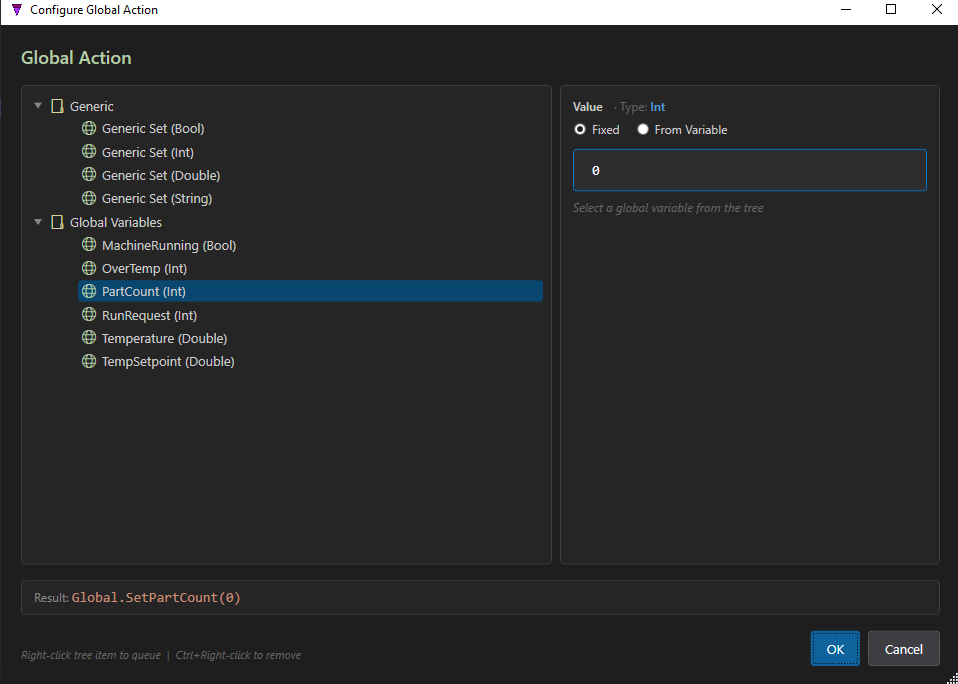
Global.SetPartCount(0).Global.SetPartCount(0)
Save the Global Variables page first. Globals appear in this dialog once they are committed to the project. Each Composer page has its own Save button (separate from Save All) — click Save on the Global Variables page and your globals show up here.
From a variable, keys and records
Like equipment, a global's value can be fixed or read from another signal, and globals support map keys and record fields:
| Form | Example |
|---|---|
| Set (fixed) | Global.SetCounter(0) |
| Set (from a signal) | Global.SetTarget(Motor.IMotor.Speed) |
| Map key | Global.SetConfig['mode']('AUTO') |
| Record field | Global.SetRecordField('Status','Code',0) |
Concrete by nature. A global is a single project-wide variable, so a global action is complete as authored — there is nothing to map in the composite. Only the source of a from-variable value (if it references equipment) is mapped later.