
Terms
Terms are the building blocks of a condition. A term is either a variable reference (a clickable box) or a numeric literal (a small text field). You add terms from your equipment and global variables — the two you will use most.
Where conditions live
Conditions are authored on the Generic Composer → Conditions page. Each condition is a row with a Name and an IF expression; the terms you add reference your equipment and globals.

Adding a term
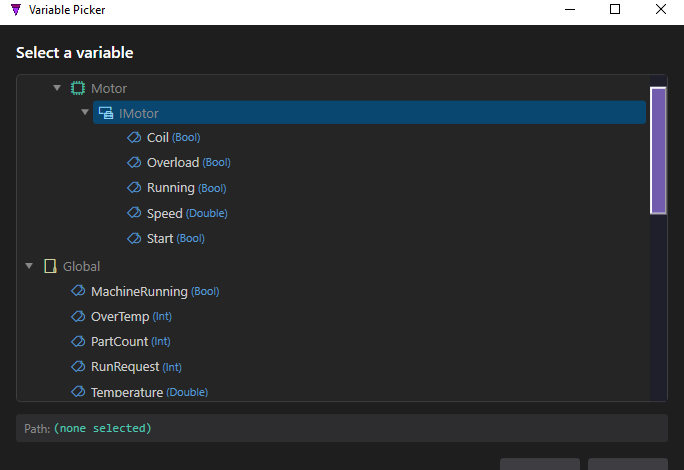
Click + to add a term. A new empty box appears (with a red − to delete it). Double-click the empty box to open the Variable Picker, then choose what it references.
Equipment terms
An equipment term references one signal of an equipment interface, as Equipment.Interface.Variable. Picking Motor → IMotor → Running inserts:
Motor.IMotor.Running
A Bool signal (like Running, Overload, Coil) stands on its own as a true/false term. A numeric signal (like Speed, a Double) is compared against a value — see Operators & Grouping.
Global terms
A global term references a project global variable. Picking Global → Temperature inserts:
Global.Temperature > 80
Temperature is a Double, so it forms a comparison with a numeric literal term. A Bool global stands alone.
Save the Global Variables page first. The Variable Picker lists the Global category once your globals are committed to the project. Each Composer page has its own Save button (separate from Save All) — click Save on the Global Variables page, and the globals then appear alongside Equipment in the picker.
Two-term example
Two equipment terms joined by AND:
IF Motor.IMotor.Running AND Motor.IMotor.Overload
Prefix a Bool term with NOT to negate it — NOT Motor.IMotor.Overload reads “not overloaded.” NOT and parentheses are covered in Operators & Grouping.