
Composite Composer Instances
A standalone block is a template. To make it control a real machine, you instantiate it in a composite and assign its references — equipment, globals and timers — to concrete hardware.
Add an instance
Open the Composite Composer, select a composite, and go to its Logic Blocks page. Click + Add, name the instance, and double-click the Template cell to pick your block (e.g. LineControl).
What you assign
StateTick reads the block's body and lists every reference it uses as a row to bind. The Status reads Configure until they are all assigned:

Line1: an equipment ref (Motor / IMotor) and four global refs, each awaiting a binding.There are four kinds of binding — parameters, equipment refs, global refs and timer refs. Expand the instance and assign each one below; the Status turns green once they all resolve.
Assign parameters
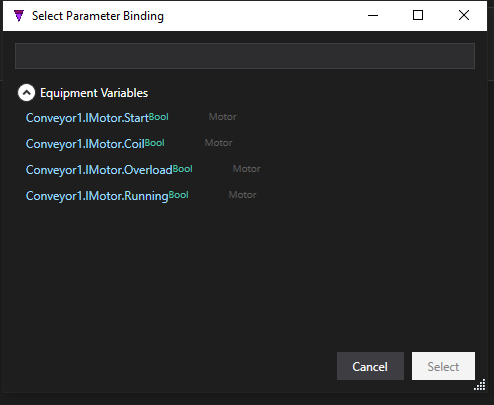
Each of the block's parameters is listed under Parameters. Double-click one to open the binding advisor — a list of the variables it can bind to, filtered to the parameter's type: a global, an equipment interface signal, or a timer property. Pick one to drive that parameter.
Assign equipment
Step 1 — place the device. On the composite's Equipment page, click + Single, pick the template (Motor), and name the instance (e.g. Conveyor1).

Conveyor1 instance of the Motor template, placed on the composite.Step 2 — bind the ref. Back on the Logic Blocks page, double-click the equipment ref's value. Pick the instance to bind it to:
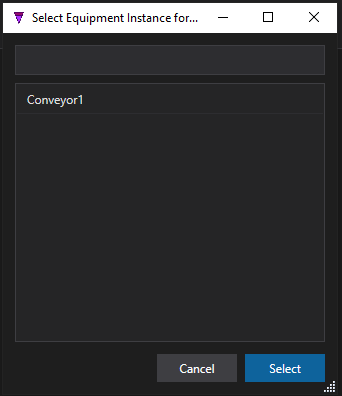
Conveyor1.The ref now shows the bound instance:

Motor (IMotor) is now bound to Conveyor1. The same template can drive a different motor in another composite.Assign globals
Global refs are matched to your project globals by name automatically — Global.PartCount in the body binds to the PartCount global with nothing to do. They are listed so you can confirm them, or double-click to point one at a different global.
Assign timers
If the block uses timers, each timer name appears as a timer ref. Double-click it to bind to a timer defined on the composite's Timers page — that is where the placeholder name from the body resolves to a real timer.
Assign them all → green
Once every reference is assigned, the instance Status turns green and the block is live. That is the payoff of ST blocks: author the control logic once, then drive many machines by re-assigning references — no copy‑paste, no drift.
See further — run a block from a state. A logic-block instance can be executed from a machine state as a logic block action — Logic.Execute('LineControl'). The state references the block by name and binds to a configured instance in the composite. See States → Logic Block Actions.
Try it in StateTick
Write your control logic once as an ST block, validate it live, then reuse it across every machine in your factory.
Get Started →