
On Entry, On Exit & Steps
All three groups are authored identically — the same + Add menu, the same action strings. They differ only in when the runtime executes them relative to the state's lifetime.
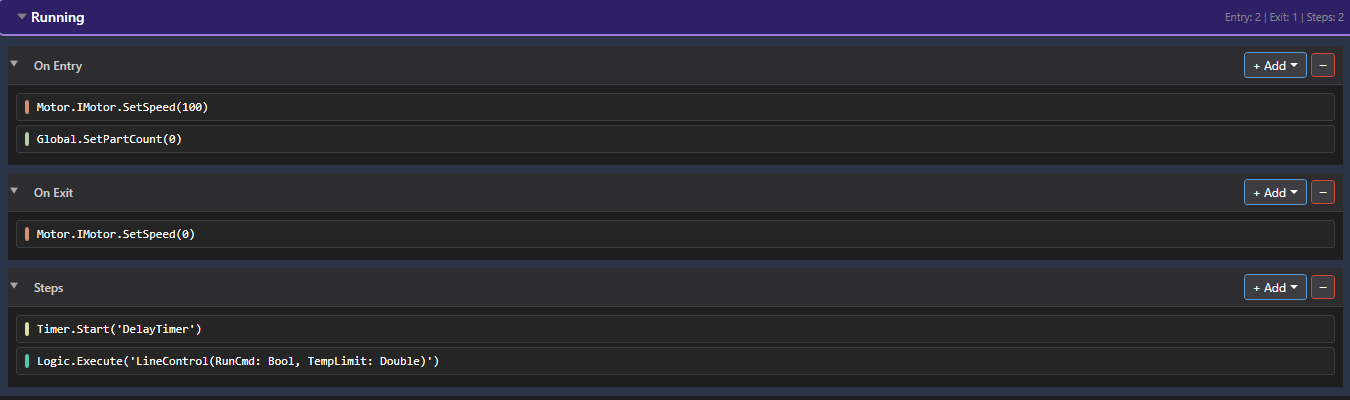
The three groups
| Group | When it runs | Typical use |
|---|---|---|
| On Entry | Once, the scan the state becomes active. | Set setpoints, reset counters, start a timer, kick off a one-shot. |
| Steps | Every scan, continuously, while the state is active. | Hold outputs, run a control loop, keep a value updated. |
| On Exit | Once, the scan the state is left. | Turn outputs off, clean up, stop a timer. |
In the Running state above: On Entry commands the motor to 100 and zeroes the part count; Steps keep a delay timer running and execute a control block each scan; On Exit commands the motor back to 0. Enter once, run continuously, leave once.
“Steps” are cyclic actions, not condition-gated sub-steps. A step here is not a “do X, then wait for a condition, then advance” construct. Every action in the Steps group runs on every scan the state is active. State-to-state transitions are decided elsewhere — by conditions (an IN_STATE() term) and the FSM planner — not inside a state's Steps.
Actions are just text
Whatever group it lives in, an action is stored as a single text string — Motor.IMotor.SetSpeed(100), Timer.Start('DelayTimer'), Logic.Execute('LineControl'). The dialogs on the next pages just help you build that string correctly. The group only decides when the string is evaluated.