
Composite Composer Mapping
A state authored in the Generic Composer is a generic template — its actions reference equipment templates, timer placeholders and logic blocks by name. To run it on a real machine, you instantiate the state in a composite and map every generic action to a concrete instance.
Add a state instance
Open the Composite Composer, select a composite, and go to its States section. Click + Add, then double-click the Template cell — the picker previews each state's actions grouped by Entry / Steps / Exit:
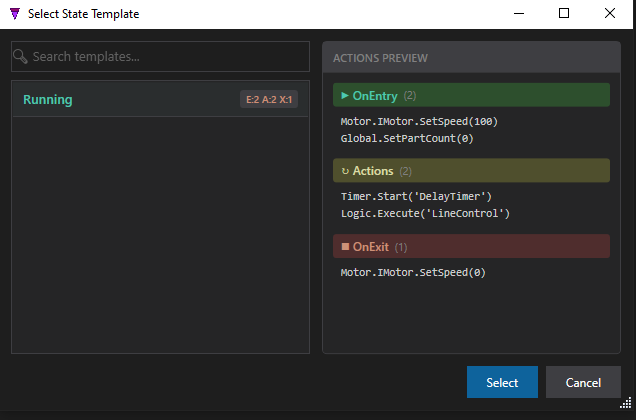
Running template — its actions previewed before you commit.What surfaces for mapping
Expand the instance and StateTick lists every action, tagged by kind, with the target it needs. Freshly added, the equipment and logic targets resolve to instances in this composite, but the timer is still unmapped (?):

?).| Action kind | Maps to |
|---|---|
| Equipment | A concrete equipment instance's variable — Motor → Conveyor1.IMotor.Speed. |
| Global | Nothing — already concrete. (Only a from-variable source is mapped.) |
| Generic | Any equipment instance variable of the matching type. |
| Timer | A timer instance in the composite's Timers section. |
| Logic Block | A configured logic-block instance — Logic.Execute('LineControl', Instance:='Line1'). |
Map the timer
Double-click the timer's ?. If the composite has no timers yet, add one to its Timers section first; then the picker lists it — pick C1_MainDelay for the DelayTimer placeholder. Once every action is bound, the Status turns to ✓ Mapped:

Conveyor1, timer to C1_MainDelay, logic to Line1. Status: ✓ Mapped.Author once, reuse everywhere. The same Running template can drive Conveyor1 in this composite and Conveyor2 in another — each instance maps the generic actions to its own hardware. The Value fields (100, 0) are per-instance overrides, so one machine can enter at 100 and another at 250 from the identical state.
Try it in StateTick
Author a state machine once with generic actions, then map it to real hardware in every machine you build.
Get Started →