
Full Example: A Running State
One sweep: author a Running state that uses every action kind across all three groups, then instantiate and map it onto a real machine.
1. Have the pieces
You will reference an equipment (Motor with interface IMotor), some globals (PartCount), and an ST Logic Block (LineControl). A timer placeholder is named as you go.
2. Author the state
On Generic Composer → States, add a state, rename it Running, and fill the three groups with the + Add menu — an equipment action and a global action on entry, a timer and a logic block in steps, an equipment action on exit:
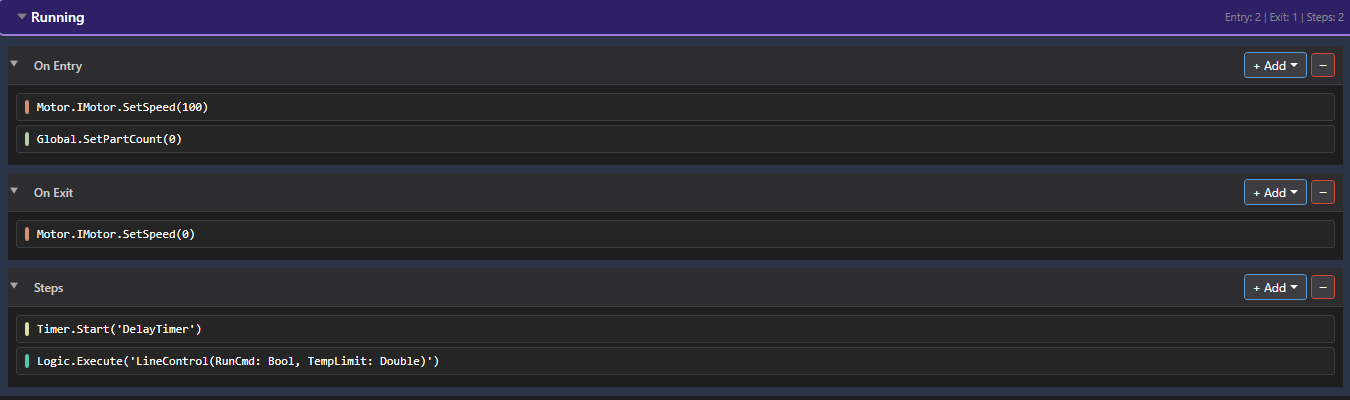
On Entry   Motor.IMotor.SetSpeed(100)
           Global.SetPartCount(0)
Steps      Timer.Start(DelayTimer)
           Logic.Execute('LineControl')
On Exit    Motor.IMotor.SetSpeed(0)
Click Save on the States page to commit it.
3. Instantiate in a composite
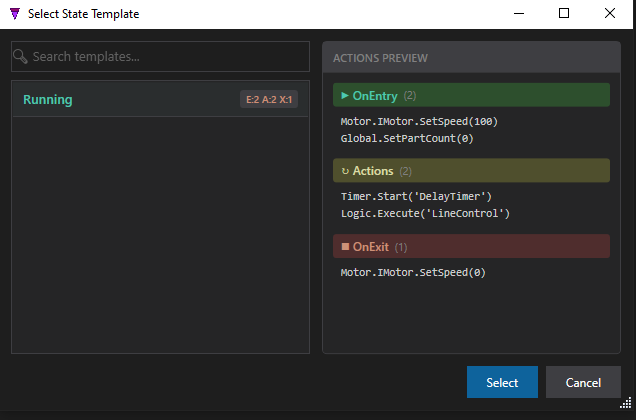
In the Composite Composer, on the composite's States section, + Add an instance and pick Running as its template. The action preview confirms what you built:
4. Map to concrete hardware
Expand the instance and bind each generic action: Motor → Conveyor1.IMotor.Speed, the DelayTimer placeholder → a real timer (C1_MainDelay), LineControl → the Line1 logic-block instance. The global needs nothing. Status turns ✓ Mapped:

Conveyor1.5. Reuse
That state is now a running mode of Conveyor1. Drop another instance of the same template into a different composite, map it to Conveyor2, and you have the identical behaviour on a second machine — the payoff of the whole chain: equipment + globals + logic blocks → state → composite mapping.
Try it in StateTick
Author a state machine once with generic actions, then map it to real hardware in every machine you build.
Get Started →