
Parameters
Parameters are the typed inputs of an ST Logic Block. They let one block behave differently each time it's used — a speed limit here, a timeout there — without rewriting the logic.
The four parameter types
A parameter is one of Bool, Int, Double or String. Add one with the + button in the block's Parameters header, then set its name and type. The LineControl block below has two: RunCmd (Bool) and TempLimit (Double).
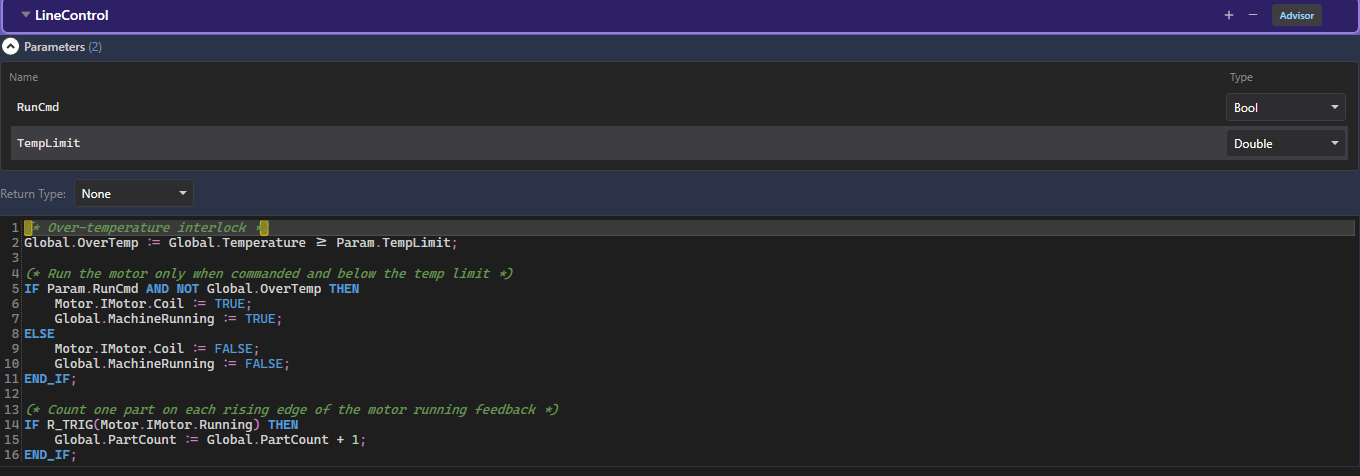
Bool command and a Double setpoint.Referencing a parameter
Inside the body, read a parameter with the Param. prefix:
(* Convert a raw count into a fill percentage *)
Global.FillPct := (Param.RawCount * 100) / Param.FullCount;
Parameters are read-only inputs — you compute with them, and write the result to a global or an equipment signal.
Where parameters get their values — mapping
A parameter has no value on its own. When you place the block in a composite, each parameter becomes a mapping row. Double-click it to open the binding advisor, which lists the variables that parameter can be bound to — filtered to its type:
You map a parameter to a variable, not a fixed number — so the same block draws its inputs from different signals on each machine. Map RunCmd to one line's start signal here and another line's there; the logic stays identical. See Composite Instances for the full binding flow.
Tip: keep parameters for things that change per instance (limits, setpoints, enable flags). For values shared machine-wide, read a global directly instead.