
The Code Advisor
You don't hand-type paths or function names. The ST Code Advisor is a searchable catalogue of everything you can insert — your variables, equipment signals and the built-in functions — dropped into your code exactly right.
Opening it
Click Advisor on any block. Search or browse the tree, select a node, and click Insert. It's a non-modal helper, so you can keep it open beside the editor.
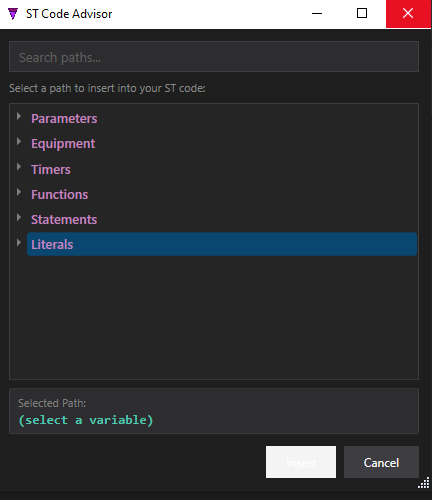
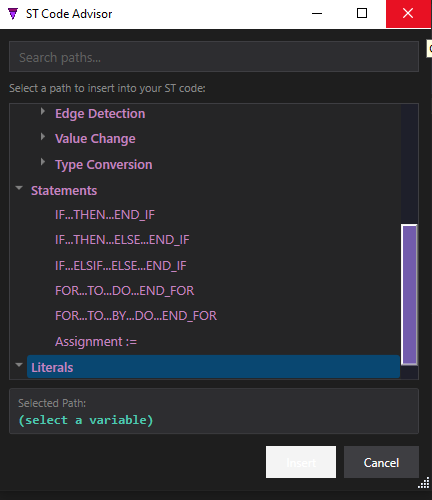
Top-level categories are Parameters, Globals, Equipment, Timers, Conditions, Functions, Statements and Literals. The variable categories insert the correct path (e.g. Motor.IMotor.Coil); the rest insert ready-to-fill snippets.
The built-in functions
These are the operations the Advisor inserts for you — the ones you map onto your own signals:
| Family | Functions |
|---|---|
| Edge detection | R_TRIG(x) (rising) F_TRIG(x) (falling) |
| Value change | RISE(x) FALL(x) CHANGE(x) RECORD_CHANGE(rec) |
| Type conversion | INT_TO_REAL(x) REAL_TO_INT(x) INT_TO_FLOAT(x) FLOAT_TO_INT(x) |
| Timer control | START_TIMER('T'); STOP_TIMER('T'); RESET_TIMER('T'); RESTART_TIMER('T'); SET_TIMER_PT('T', ms); TON/TOF/TP(…) |
| Timer query | TON_Q('T') / TOF_Q / TP_Q / TIMER_Q (done) TON_ET('T') / … / TIMER_ET (elapsed ms) |
| Maps | MAP_GET(m, k) MAP_SET(m, k, v) MAP_ADD(…) MAP_REMOVE(…) |
| Conditions | COND('Name') → the named condition's current Bool |
| Time literals | T#500ms T#2s T#5m T#1h |
Timers are mapped in the composite. A timer name like 'Dwell' is a placeholder inside the block; it resolves only once the block is instantiated in a composite that defines that timer — see Composite Instances.