
Composite Composer Instances
A condition authored in the Generic Composer is a generic template — it references equipment templates (Motor.IMotor.Running) and placeholders. To use it on a real machine, you instantiate it in a composite and map each generic term to a concrete instance.
Add a condition instance
Open the Composite Composer, select a composite, and go to its Conditions page (highlighted below). Click + Add, name the instance, and double-click the Template cell to pick your condition (e.g. Condition1).

What surfaces for mapping
StateTick reads the condition and lists each term that needs a concrete signal. The expression preview shows unmapped slots as _, and the Status reads Configure until they are all bound:

Motor.IMotor.Running, Motor.IMotor.Overload) awaits a concrete signal; preview shows IF _ AND _.Generic vs concrete. Equipment terms, timers, edges/value-change, array aggregates, composite-state and queue terms need mapping. Globals, literals, and conditions auto-map (a global is already concrete), as are edges wrapping a Global.* signal.
Map a term
Double-click a term's mapping cell to open its picker. For an equipment term it lists the composite's matching equipment instances — expand one and choose the concrete signal:
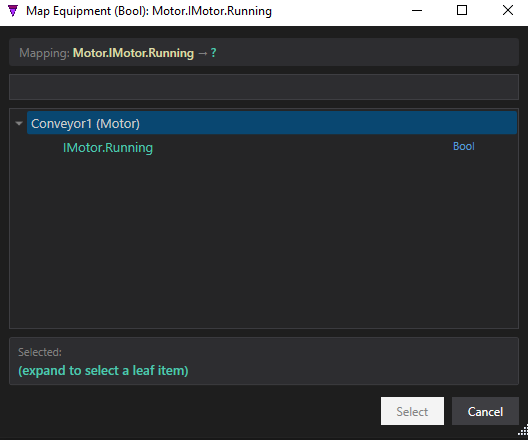
Motor.IMotor.Running to the concrete Conveyor1.IMotor.Running.Once bound, the term shows its concrete path and the preview updates:

Motor.IMotor.Running is now Conveyor1.IMotor.Running; the preview reads IF Conveyor1.IMotor.Running AND _.Different mapping dialogs open per term kind — equipment instances, an edge/value variable picker, a timer, a composite+state, a queue. Map them all and the Status turns green. The same condition template can then guard Conveyor1 here and Conveyor2 in another composite — author once, reuse everywhere.
Try it in StateTick
Build reusable conditions once, then map them to real hardware in every machine you design.
Get Started →