
Equipment Actions
An equipment action writes one interface variable of a piece of equipment — Equipment.Interface.SetVariable(value). It is the most common action a state performs.
The dialog
Add → Equipment Action opens a picker. Expand Equipment → your equipment (e.g. Motor) and choose the setter you want; the right pane sets the Value. Selecting SetSpeed (Double) with a fixed value of 100 builds the action live in the Result line:
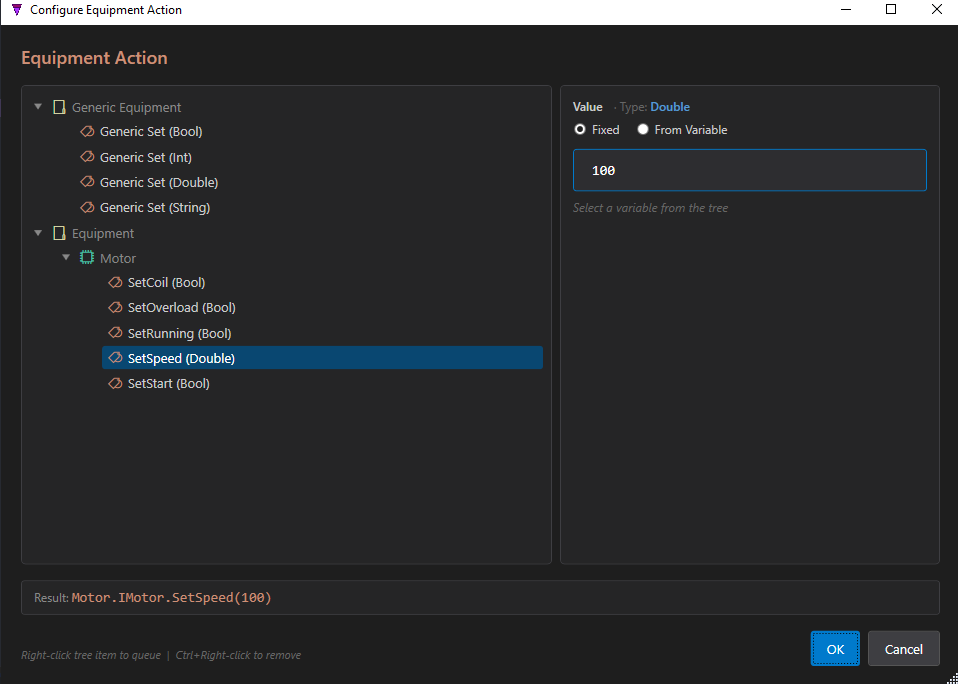
Motor.IMotor.SetSpeed(100)
Fixed value or from a variable
The value can be a Fixed literal, or read From Variable — another equipment signal or a global. That lets one signal drive another:
Motor.IMotor.SetSpeed(Motor.IMotor.Output)   // from an equipment signal
Motor.IMotor.SetSpeed(Global.TempSetpoint)   // from a global
Text patterns
| Form | Example |
|---|---|
| Set (fixed) | Motor.IMotor.SetSpeed(100) |
| Set (from variable) | Motor.IMotor.SetSpeed(Motor.IMotor.Output) |
| Array element | Motors[0].IMotor.SetSpeed(50) |
| Map key | Motor.IMotor.SetConfig['Kp'](1.0) |
| Record field | Motor.IMotor.SetRecordField('Data','Active',true) |
Generic vs concrete. An equipment action names a specific equipment template (Motor). When you use the state in a composite, that Motor placeholder is mapped to a concrete instance — Conveyor1, Line2, and so on. See Composite Mapping. If you want an action with no fixed target, use a generic action instead.