
Full Example: End to End
One sweep from an empty project to a running block: create the globals, build the equipment, use both inside an ST block, then instantiate and assign it in a composite. This ties the whole series together.
1. Create the globals
In Generic Composer → Global Variables, add the shared state the machine needs — a run flag, a part counter, a temperature, an over-temp flag. (Full walkthrough: Global Variables.)

2. Build the equipment
Define an interface for the device's signals (IMotor: Start, Coil, Overload, Speed, Running), then compose it into an equipment called Motor.
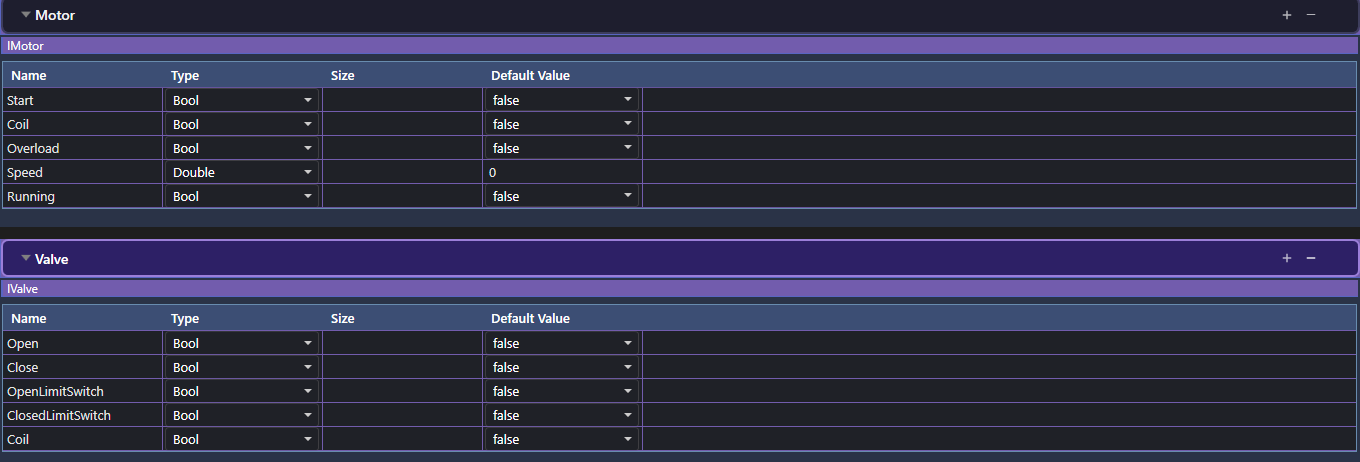
Motor is composed of the IMotor interface — ready to reference from logic.3. Write the ST block
In ST LogicBlocks, author LineControl with parameters RunCmd and TempLimit. Its body reads globals and the motor's signals, and drives the motor's coil — validating with zero errors as you type.
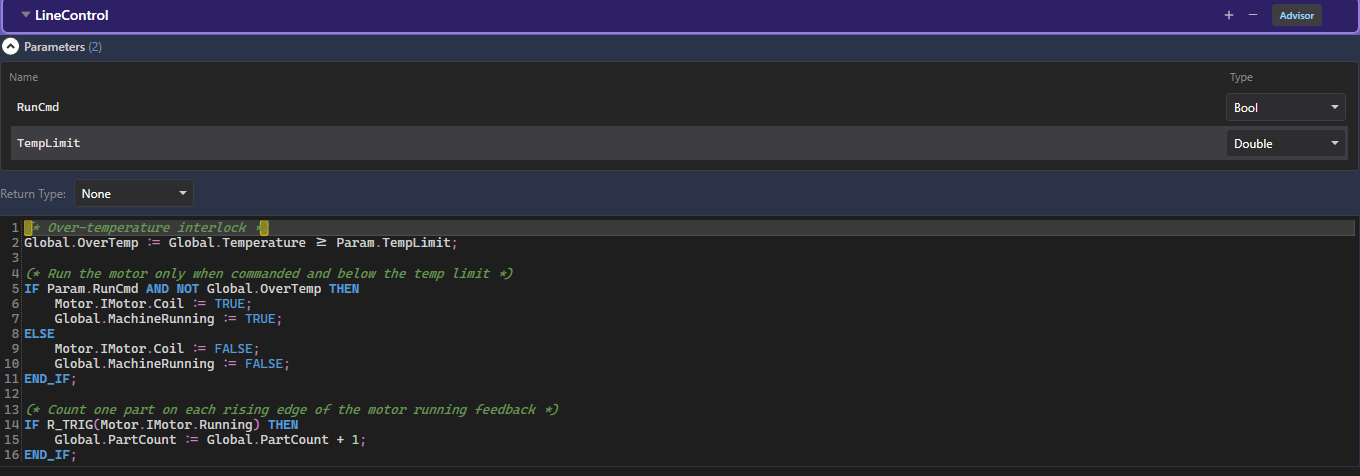
(* Run the motor only when commanded and below the temp limit *)
IF Param.RunCmd AND NOT Global.OverTemp THEN
    Motor.IMotor.Coil := TRUE;
    Global.MachineRunning := TRUE;
ELSE
    Motor.IMotor.Coil := FALSE;
    Global.MachineRunning := FALSE;
END_IF;

IF R_TRIG(Motor.IMotor.Running) THEN
    Global.PartCount := Global.PartCount + 1;
END_IF;
4. Instantiate & assign in a composite
In the Composite Composer, place a concrete Conveyor1 instance of Motor on the composite's Equipment page:

Conveyor1, from the Motor template.Add a Logic Blocks instance of LineControl, then assign its references — the equipment ref to Conveyor1, globals auto-map by name, and each parameter to a value or path:

Motor reference now points at Conveyor1; globals match by name.5. Green — it runs
Once every reference is assigned, the instance turns green and runs each scan against the composite's world. To drive a second line, drop another LineControl instance and point its equipment ref at a different motor — same logic, new machine. That is the payoff of the whole chain: globals → interfaces → equipment → ST block → composite.
Try it in StateTick
Write your control logic once as an ST block, validate it live, then reuse it across every machine in your factory.
Get Started →